Importing landscapes

This guide shows how to import and maintain landscapes as code using the LandscapeImportData JSON schema.

This is useful for:

  • Generating diagrams with LLMs
  • Syncing landscapes via CI/CD pipelines
  • Maintaining diagrams in a git repository

Prerequisites:

  • IcePanel account
  • API key (created from https://app.icepanel.io/organizations/:organizationId/manage/api-keys)

Steps

1

Select a landscape

To import diagrams into a landscape, you will need the landscape ID, which can be found in the URL:

https://app.icepanel.io/landscapes/:landscapeId/versions/latest/overview

Or, you can get the landscape ID with a GET request to the /landscapes endpoint.

GET
/v1/organizations/:organizationId/landscapes
1curl https://api.icepanel.io/v1/organizations/organizationId/landscapes \
2 -H "X-API-Key: <apiKey>"

This returns a list of all landscapes in your organization. Note the id of the landscape you want to import into.

2

Create your import file

Your landscape can be modelled in a JSON or YAML file by using the LandscapeImportData JSON schema. Each data model has a persistent id field, which is useful for upserting existing models.

1{
2"modelObjects": [
3{
4 "id": "domain-ecommerce",
5 "name": "E-Commerce Platform",
6 "parentId": null,
7 "type": "domain"
8},
9
10{
11 "id": "person-customer",
12 "name": "Customer",
13 "parentId": "domain-ecommerce",
14 "type": "actor",
15 "tagIds": ["tag-external"]
16},
17{
18 "id": "person-admin",
19 "name": "Admin User",
20 "parentId": "domain-ecommerce",
21 "type": "actor",
22 "tagIds": ["tag-internal"]
23},
24
25{
26 "id": "system-storefront",
27 "name": "Storefront",
28 "parentId": "domain-ecommerce",
29 "type": "system",
30 "tagIds": ["tag-internal"]
31},
32{
33 "id": "system-payment",
34 "name": "Payment Gateway",
35 "parentId": "domain-ecommerce",
36 "type": "system",
37 "tagIds": ["tag-external"]
38},
39{
40 "id": "system-email",
41 "name": "Email Service",
42 "parentId": "domain-ecommerce",
43 "type": "system",
44 "tagIds": ["tag-external"]
45},
46
47{
48 "id": "container-web",
49 "name": "Web App",
50 "parentId": "system-storefront",
51 "type": "app",
52 "tagIds": ["tag-internal"]
53},
54{
55 "id": "container-api",
56 "name": "API Server",
57 "parentId": "system-storefront",
58 "type": "app",
59 "tagIds": ["tag-internal"]
60},
61{
62 "id": "container-db",
63 "name": "Product Database",
64 "parentId": "system-storefront",
65 "type": "database",
66 "tagIds": ["tag-internal"]
67},
68{
69 "id": "container-cache",
70 "name": "Cache",
71 "parentId": "system-storefront",
72 "type": "database",
73 "tagIds": ["tag-internal"]
74},
75
76{
77 "id": "component-product-service",
78 "name": "Product Service",
79 "parentId": "container-api",
80 "type": "component",
81 "tagIds": ["tag-internal"]
82},
83{
84 "id": "component-order-service",
85 "name": "Order Service",
86 "parentId": "container-api",
87 "type": "component",
88 "tagIds": ["tag-internal"]
89},
90{
91 "id": "component-auth-service",
92 "name": "Auth Service",
93 "parentId": "container-api",
94 "type": "component",
95 "tagIds": ["tag-internal"]
96},
97{
98 "id": "component-notification-service",
99 "name": "Notification Service",
100 "parentId": "container-api",
101 "type": "component",
102 "tagIds": ["tag-internal"]
103}
104],
105
106"modelConnections": [
107{
108 "id": "conn-customer-web",
109 "name": "Browses store via HTTPS",
110 "direction": "outgoing",
111 "originId": "person-customer",
112 "targetId": "container-web"
113},
114{
115 "id": "conn-admin-web",
116 "name": "Manages catalog via HTTPS",
117 "direction": "outgoing",
118 "originId": "person-admin",
119 "targetId": "container-web"
120},
121{
122 "id": "conn-web-api",
123 "name": "REST API calls",
124 "direction": "outgoing",
125 "originId": "container-web",
126 "targetId": "container-api"
127},
128{
129 "id": "conn-api-db",
130 "name": "Reads/writes",
131 "direction": "outgoing",
132 "originId": "container-api",
133 "targetId": "container-db"
134},
135{
136 "id": "conn-api-cache",
137 "name": "Caches product data",
138 "direction": "outgoing",
139 "originId": "container-api",
140 "targetId": "container-cache"
141},
142{
143 "id": "conn-order-payment",
144 "name": "Processes payment",
145 "direction": "outgoing",
146 "originId": "component-order-service",
147 "targetId": "system-payment"
148},
149{
150 "id": "conn-notification-email",
151 "name": "Sends order confirmations",
152 "direction": "outgoing",
153 "originId": "component-notification-service",
154 "targetId": "system-email"
155},
156{
157 "id": "conn-product-db",
158 "name": "Queries product catalog",
159 "direction": "outgoing",
160 "originId": "component-product-service",
161 "targetId": "container-db"
162},
163{
164 "id": "conn-auth-db",
165 "name": "Reads user records",
166 "direction": "outgoing",
167 "originId": "component-auth-service",
168 "targetId": "container-db"
169},
170{
171 "id": "conn-order-notification",
172 "name": "Triggers notifications",
173 "direction": "outgoing",
174 "originId": "component-order-service",
175 "targetId": "component-notification-service"
176}
177],
178
179"tagGroups": [
180{
181 "id": "tag-group-ownership",
182 "name": "Ownership",
183 "icon": "tag"
184}
185],
186
187"tags": [
188{
189 "id": "tag-internal",
190 "name": "Internal",
191 "color": "blue",
192 "groupId": "tag-group-ownership"
193},
194{
195 "id": "tag-external",
196 "name": "External",
197 "color": "orange",
198 "groupId": "tag-group-ownership"
199}
200]
201}
1# yaml-language-server: $schema=https://api.icepanel.io/v1/schemas/LandscapeImportData
2
3tagGroups:
4- id: tag-group-ownership
5name: Ownership
6icon: tag
7
8tags:
9- id: tag-internal
10name: Internal
11color: blue
12groupId: tag-group-ownership
13- id: tag-external
14name: External
15color: orange
16groupId: tag-group-ownership
17
18modelObjects:
19- id: domain-ecommerce
20name: E-Commerce Platform
21type: domain
22
23- id: person-customer
24name: Customer
25type: actor
26parentId: domain-ecommerce
27tagIds:
28 - tag-external
29
30- id: person-admin
31name: Admin User
32type: actor
33parentId: domain-ecommerce
34tagIds:
35 - tag-internal
36
37- id: system-storefront
38name: Storefront
39type: system
40parentId: domain-ecommerce
41tagIds:
42 - tag-internal
43
44- id: system-payment
45name: Payment Gateway
46type: system
47parentId: domain-ecommerce
48tagIds:
49 - tag-external
50
51- id: system-email
52name: Email Service
53type: system
54parentId: domain-ecommerce
55tagIds:
56 - tag-external
57
58- id: container-web
59name: Web App
60type: app
61parentId: system-storefront
62tagIds:
63 - tag-internal
64
65- id: container-api
66name: API Server
67type: app
68parentId: system-storefront
69tagIds:
70 - tag-internal
71
72- id: container-db
73name: Product Database
74type: database
75parentId: system-storefront
76tagIds:
77 - tag-internal
78
79- id: container-cache
80name: Cache
81type: database
82parentId: system-storefront
83tagIds:
84 - tag-internal
85
86- id: component-product-service
87name: Product Service
88type: component
89parentId: container-api
90tagIds:
91 - tag-internal
92
93- id: component-order-service
94name: Order Service
95type: component
96parentId: container-api
97tagIds:
98 - tag-internal
99
100- id: component-auth-service
101name: Auth Service
102type: component
103parentId: container-api
104tagIds:
105 - tag-internal
106
107- id: component-notification-service
108name: Notification Service
109type: component
110parentId: container-api
111tagIds:
112 - tag-internal
113
114modelConnections:
115- id: conn-customer-web
116name: Browses store via HTTPS
117direction: outgoing
118originId: person-customer
119targetId: container-web
120
121- id: conn-admin-web
122name: Manages catalog via HTTPS
123direction: outgoing
124originId: person-admin
125targetId: container-web
126
127- id: conn-web-api
128name: REST API calls
129direction: outgoing
130originId: container-web
131targetId: container-api
132
133- id: conn-api-db
134name: Reads/writes
135direction: outgoing
136originId: container-api
137targetId: container-db
138
139- id: conn-api-cache
140name: Caches product data
141direction: outgoing
142originId: container-api
143targetId: container-cache
144
145- id: conn-order-payment
146name: Processes payment
147direction: outgoing
148originId: component-order-service
149targetId: system-payment
150
151- id: conn-notification-email
152name: Sends order confirmations
153direction: outgoing
154originId: component-notification-service
155targetId: system-email
156
157- id: conn-product-db
158name: Queries product catalog
159direction: outgoing
160originId: component-product-service
161targetId: container-db
162
163- id: conn-auth-db
164name: Reads user records
165direction: outgoing
166originId: component-auth-service
167targetId: container-db
168
169- id: conn-order-notification
170name: Triggers notifications
171direction: outgoing
172originId: component-order-service
173targetId: component-notification-service
3

Import your landscape

You can import the file through the UI or the API.

Each id in your import file maps to a resource in IcePanel. It’s either created if the resource does not exist or updated otherwise.

From the landscape page, click Import model > File Upload and upload your file.
Import landscape file

4

Set up CI/CD

To keep your landscape in sync automatically, call the import endpoint in a CI/CD job on every push to your main branch.

Add two repository secrets in GitHub (Settings > Secrets and variables > Actions):

  • ICEPANEL_LANDSCAPE_ID
  • ICEPANEL_API_KEY

Create a workflow file at .github/workflows/icepanel-sync.yml:

your-project
.github
workflows
icepanel-sync.yml
icepanel-landscape-import.yaml
README.md
.github/workflows/icepanel-sync.yml
1name: Synchronise IcePanel landscape
2
3on:
4 push:
5 branches:
6 - main
7 - master
8
9jobs:
10 synchronise-landscape:
11 runs-on: ubuntu-latest
12 steps:
13 - uses: actions/checkout@v4
14
15 - name: Import landscape
16 run: |
17 curl -sf -X POST "https://api.icepanel.io/v1/landscapes/${{ vars.ICEPANEL_LANDSCAPE_ID }}/versions/latest/import" \
18 -H "X-API-Key: ${{ secrets.ICEPANEL_API_KEY }}" \
19 -H "Content-Type: application/yaml" \
20 --data-binary @icepanel-landscape-import.yaml

This triggers the synchronise-landscape job on every push to main/master.

Generating diagrams with LLMs

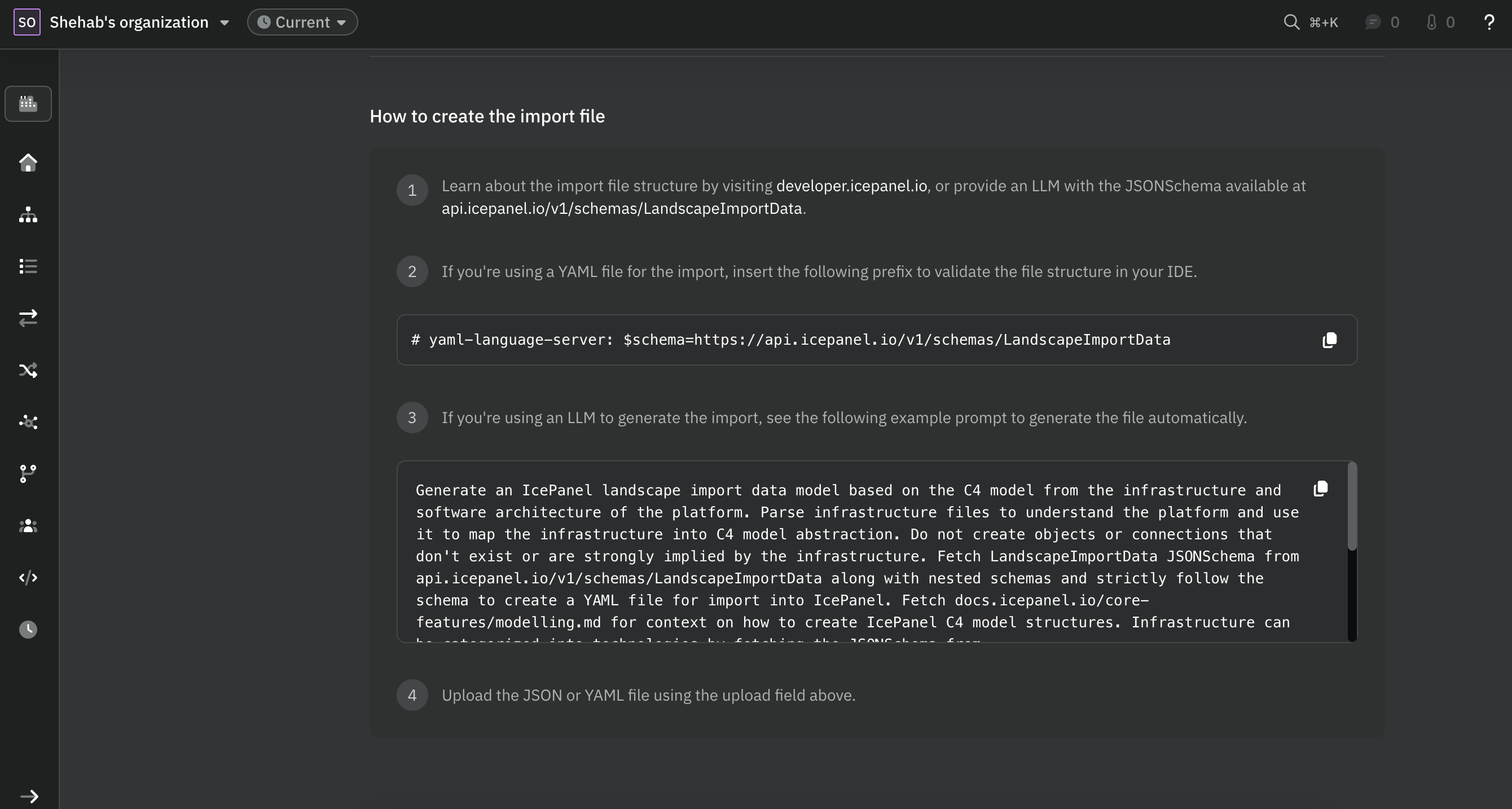
LLMs can generate a valid import file from a description of your architecture. The LandscapeImportData schema is publicly accessible, so you can point the LLM directly at it to validate the output.

See an example prompt that generates an import file for IcePanel.

Prompt
Generate an IcePanel landscape import data model based on the C4 model from the infrastructure and software architecture of the platform.
Parse infrastructure files to understand the platform and use it to map the infrastructure into C4 model abstraction.
Do not create objects or connections that don't exist or are strongly implied by the infrastructure.
Fetch LandscapeImportData JSONSchema from api.icepanel.io/v1/schemas/LandscapeImportData along with nested schemas and strictly follow the schema to create a YAML file for import into IcePanel.
Fetch docs.icepanel.io/core-features/modelling.md for context on how to create IcePanel C4 model structures.
Infrastructure can be categorized into technologies by fetching the JSONSchema from api.icepanel.io/v1/schemas/CatalogTechnologyType.
Perform an exhaustive search for technologies using http requests to api.icepanel.io/v1/catalog/technologies?filter[name]=NodeJS and add the id to the technologyIds array.
If a technology cannot be found try reducing the search term to be more specific to find a match.
If a primary technology exists then assign the visual icon to icon.technologyId.
Write the resulting import data to a YAML file to the file named icepanel-landscape-import.yaml in the current directory.
Prefix the YAML file with # yaml-language-server: $schema=https://api.icepanel.io/v1/schemas/LandscapeImportData.

Example output:

Prune option

By default, data models that exist in IcePanel but are missing from your import file are left untouched. To have IcePanel delete models not present in the import file, add the prune=true query parameter.

Note that prune=true is a destructive operation. Any model objects, connections, tags, or tag groups in IcePanel that are not in your import file will be permanently deleted. Make sure your import file is the complete source of truth before using this option.

$curl -sf -X POST "https://api.icepanel.io/v1/landscapes/$ICEPANEL_LANDSCAPE_ID/versions/latest/import?prune=true" \
> -H "X-API-Key: $ICEPANEL_API_KEY" \
> -H "Content-Type: application/yaml" \
> --data-binary @icepanel-landscape-import.yaml

Namespace option

A namespace is a label that groups models by their import source. You can add a namespace to your import file to separate models by import source. When used with prune=true, only models in the same namespace are deleted. Models from other namespaces are left untouched.

This is useful for large organizations running multiple CI/CD pipelines from different repositories against the same landscape, with each pipeline managing its own models independently.

You can set the namespace in your YAML file:

1# yaml-language-server: $schema=https://api.icepanel.io/v1/schemas/LandscapeImportData
2
3namespace: my-repo
4
5modelObjects:
6 - id: system-storefront
7 name: Storefront
8 type: system

Or pass it directly in the request body when using JSON:

$curl -sf -X POST "https://api.icepanel.io/v1/landscapes/$ICEPANEL_LANDSCAPE_ID/versions/latest/import" \
> -H "X-API-Key: $ICEPANEL_API_KEY" \
> -H "Content-Type: application/json" \
> -d '{
> "namespace": "my-repo",
> "modelObjects": [...]
> }'